Commec, with no borders
The misuse of synthetic DNA has potentially global consequences, and is therefore a global responsibility. We’re evolving The Common Mechanism to meet the screening needs so anyone, anywhere in the world can choose to screen their DNA.
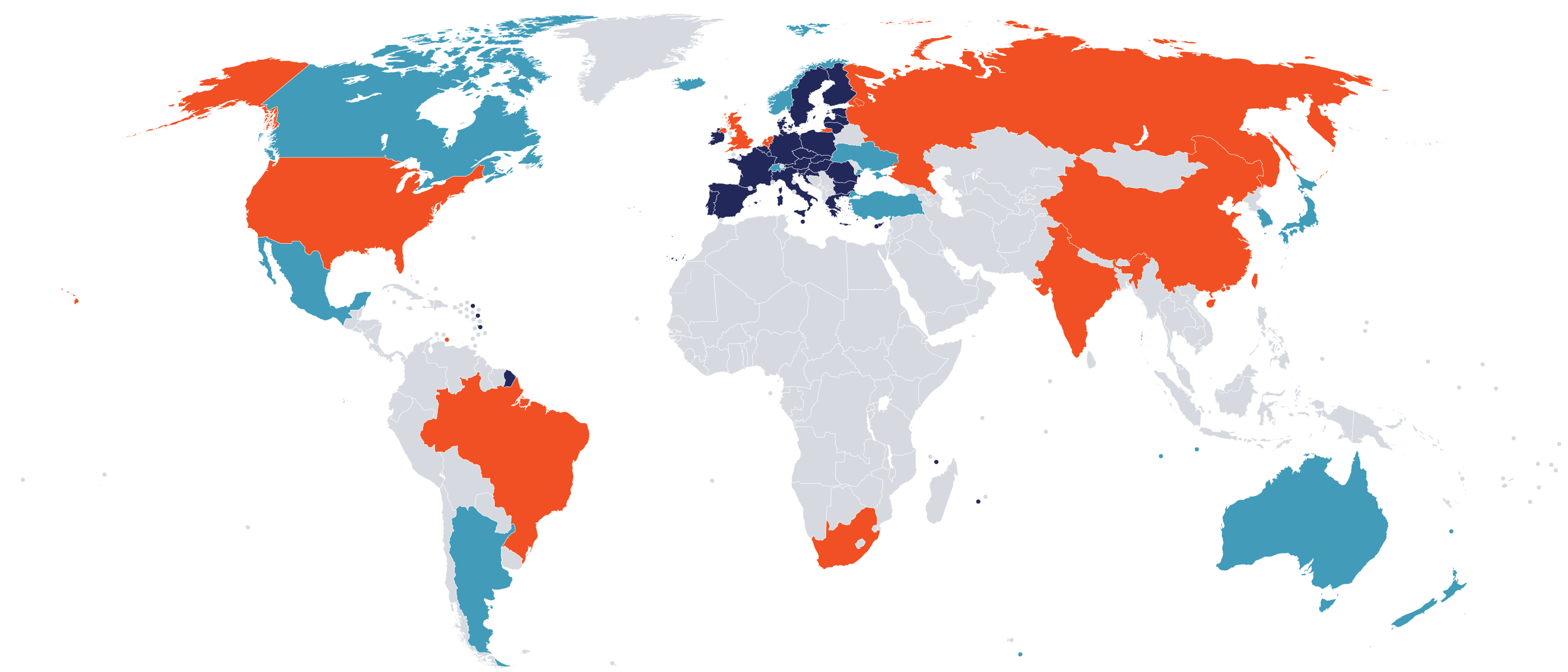
This free tool now allows people in 46 countries to screen orders with consideration for the regulations where the orders are sent from and where they will be delivered, as well as allowing companies to define individual standards through custom control lists.
Here at IBBIS we’re proud to provide the world’s most comprehensive regionally aware screening software tool: The Common Mechanism. Between the reduced database sizes, vast improvements to screen time (100-1000× faster), and the updated regional control list logic in Commec 2.0, there has never been a better time to start synthesis screening.
Once the decision has been made to screen DNA, the next question becomes how.
Albeit blunt, the central question to be answered by any biosecurity screening tool is “is this sequence dangerous?” and preferably the answer is simple: Yes. Or no. Whilst such a clear outcome is desirable for providers who need to choose what action to take next, it hides the complexity and nuance of assessing the security risk of any given DNA sequence. Real use-cases are rarely so clear cut.
This nuance is already well reflected in the global landscape of pathogen lists and export controls. Regulatory lists from organisations such as the Australia Group and European Union are broadly accepted, but national lists often include specific organisms that have local health or economic importance, reflecting real variances in risk across regions and populations. Screening tools should offer a regionally-specific “yes”, while universally flagging the highest-concern sequences and avoiding the addition of noise from irrelevant regions.
Even when a regional government hands you a human-digestible list of the toxins and pathogens they consider dangerous enough to regulate, there are still well-documented issues. Detecting a specific toxin might be trivial, but sometimes the best control point is the whole organism, and taxonomy is an evolving problem. There are constant updates in both nomenclature and classification. The ICTV recently renamed several well-known viruses of concern: Ebola virus, for example, now goes by Orthoebolavirus. Such updates are necessary as our taxonomic understanding is clarified, but can affect the interpretation of policy wording, which can reference non-existent, merged, or updated taxa. The Commec team has been indebted to work by the SBRC to track such ongoing changes.
The latest version of Commec addresses this international complexity with dynamic control lists. We give Commec access to a control list file system that is easy to create, curate, and extend, which is dynamically parsed at runtime. This data then drives screening logic to ensure that users in China see flags for dengue virus (on the national export control list), a user in Brazil sees flags for Spiroplasma citri (a local agricultural pathogen), and everyone sees flags for the pathogens that are internationally agreed to be dangerous, like smallpox and highly-pathogenic avian influenza.
Designing dynamic screening with a database of regional control lists
We hand curated a set of export and pathogen control lists which are ingested into Commec screen dynamically at runtime. This Control List Database is of course among the databases automatically downloaded with commec setup.
The current database covers 9 regions, 19 lists, and 46 countries. We cover 7 national-level control lists and an additional 39 countries through multi-national controls. The control lists have varying levels of overlap and derivation; for example, the Australia Group controls are split across two separate lists, one for human and animal pathogens and toxins and another for plant pathogens.
We have not found a way to avoid hand curation of these databases for screening purposes: there remains too great a disconnect between the language in policy documents and the latest bioinformatic databases and taxonomic rankings. We found that we often needed experts in policy and taxonomy, rather than software, to do this curation, and so chose to represent lists with the .csv filetype due to its familiarity and ease of human editing with a host of common software.
The design is deliberately modular. Commec searches recursively through the entire control list directory for any files defining a control list, then parses lists to handle duplicate and deprecated entries at runtime.
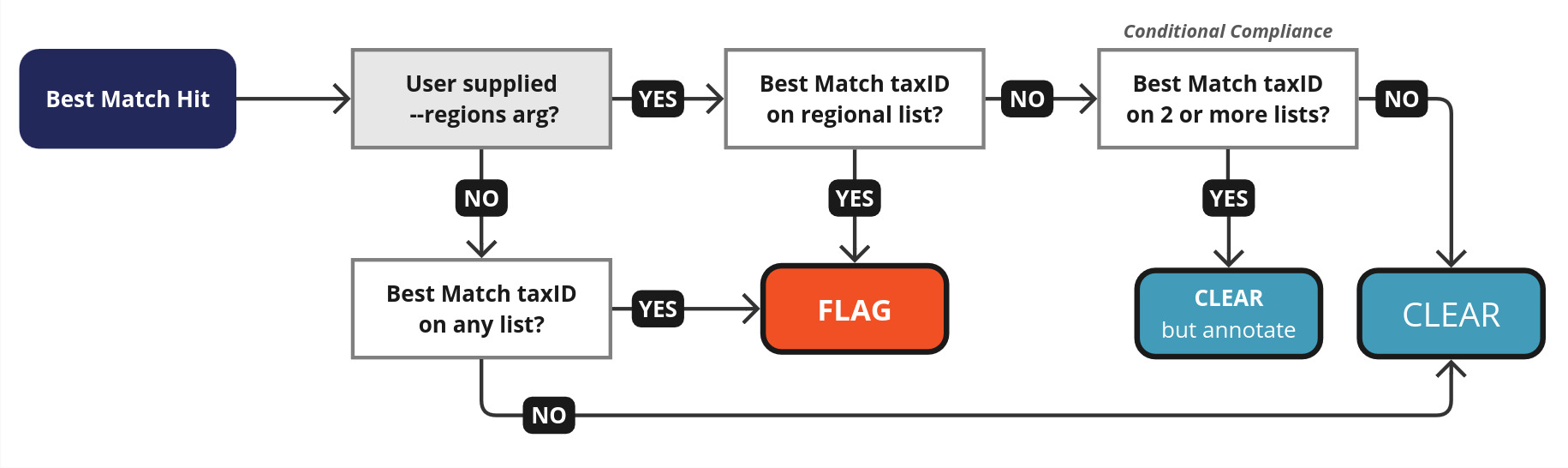
By default, Commec runs taking into account the data from all control lists, and flagging best matches to any regulated pathogens. However, by passing in --regions US,UK a user can limit flags to that regional context. Hits outside the region of interest, but that are included in at least 2 other lists, will be added as non-flag annotations, allowing users to be aware of other jurisdictions, without affecting the overall screening result.
Control lists currently specifically function on NCBI taxIDs, but we plan to allow the inclusion of specific protein accessions from UniProt for best match toxin identification on top of flags from our existing Biorisk database.
Using the new commec list tools to explore global policy
In addition to dynamic screening, Commec allows users to explore our annotated lists through the commec list command line interface. You can query the control list database by TaxID, which will summarise which lists contain that item. Furthermore, you can output a summary of all regulated items, and contrast and compare the difference in control list regulation:
Running the command:
commec list -d /mnt/commec-databases/control_lists/ -o ~/all_annotations.csv(using your own databases directory) will generate a summary .csv file. We can interrogate this output to see differences in regulation across different jurisdictions.
all_annotations.csv
tax_id,display_name,category,genus,species,strain,CN_DUPRC,ZA_EC,AG_CCL,AG_PPCCL,IN_SCOMET,EU_LAP,EU_DUECR,RU_RFECHA,RU_RFECA,US_BSATHHS,US_BSATUSDA,US_PPQUSDA,US_CCL,US_ML,BR_CIBES,UK_SAPO,UK_ATCSA,UK_COSHH,UK_SECL
36589,'Prunus armeniaca' phytoplasma,Bacteria,Candidatus Phytoplasma,'Prunus armeniaca' phytoplasma,,0,0,0,0,0,1,0,0,0,0,0,0,0,0,0,0,0,0,0
116153,Aethina tumida (Small hive beetle),Other,Aethina,Aethina tumida,,0,0,0,0,0,0,0,0,0,0,0,1,0,0,0,0,0,0,0
28099,Agrobacterium rubi,Bacteria,Agrobacterium,Agrobacterium rubi,,0,0,0,0,0,1,0,0,0,0,0,0,0,0,0,0,0,0,0
As you can see, the CSV contains columns for each list, and 1s and 0s indicating which lists regulate each organism. To find which organisms are regulated in The People’s Republic of China (the list CN_DUPRC), but not part of the Australia Group Common Control List (the lists AG_CCL and AG_PPCCL), you can examine this file using your favourite spreadsheet program, or even get your favourite AI assistant to write up a quick CSV comprehension for you.
This shows that the following agents are regulated in The People’s Republic of China but not by the Australia Group:
- Orthoflavivirus denguei, causative agent of Dengue fever. Which was removed by the CCL, but is still present in many countries’ export controls.
- Rickettsia rickettsii, the causative agent of Rocky Mountain spotted fever.
- Bartonella quintana, the causative agent of trench fever.
- Puccinia graminis, a rust that affects cereal crops.
commec list can also be used to query one or more TaxIDs to see where they are regulated. For example, running
commec list -d /mnt/commec-databases/control_lists/ -a 69245Will generate a summary for this particular strain associated with orthohantavirus, commonly referred to as Andes virus. (If you need to find the TaxID of a pathogen, you can check the CSV you created or look up the pathogen in NCBI taxonomy, though for the latter be aware that the current TaxID may not be associated with the name you expect.)
 The Common Mechanism : List
────────┐
INFO    │  *----------* CONTROLLED TAXIDS *----------*
INFO    │ Regulation Annotations for supplied TaxIDs (#1):
INFO    │    > Taxid 69245: Controlled by the following lists:
        │        > Controlled viruses Lechiguanas virus, Orthohantavirus andesense (Andes virus): CCL : V.3. Andes virus
        │        > Controlled viruses Lechiguanas virus, Orthohantavirus andesense (Andes virus): SCOMET : 2D055 Andes
        │ virus
        │        > Controlled viruses Lechiguanas virus, Orthohantavirus andesense (Andes virus): EUDUECR : Andes virus
        │        > Controlled viruses Lechiguanas virus, Orthohantavirus andesense (Andes virus): USCCL : V.3. Andes
        │ virus
        │        > Controlled viruses Lechiguanas virus, Orthohantavirus andesense (Andes virus): COSHH : Andes
        │ orthohantavirus
        │        > Controlled viruses Lechiguanas virus, Orthohantavirus andesense (Andes virus): UKSECL : Andes virus
────────┘
commec list can also be used to interrogate the compliance of all ingested lists with a provided regional context. For example, running
commec list -d /mnt/commec-databases/control_lists/ -l --regions NZwill display a list of all ingested lists and whether they do or do not apply to New Zealand, labelled with either “compliance” (Commec will FLAG any item on this list), or “conditional compliance” (Commec will only add annotations from this list, and only if two or more lists contain this same item).
Expanding with your own lists: a worked example from SecureDNA’s hazards list
The new control list system’s greatest strength is its modularity, making it easily extensible for your own needs. Here we will show a quick example of how to add a custom control list, building from the SecureDNA hazard list.
SecureDNA’s hazard list overlaps with lists included in Commec by default (export controls from the EU, China, and Australia Group, as well as the US Select Agents list). The SecureDNA team has also annotated a number of pathogens which are not regulated by those three lists, but are hazardous because they can be transmitted to humans or are potential future pandemic pathogens. For this example, we are interested in capturing the additional items that are unique to the SecureDNA hazard list. Note however we could also add the duplicate items with no issue; many of Commec’s default lists contain overlapping items.
We start with adding the following file structure inside our control_lists database directory:
┳ control_lists/
┗┳ secure_dna/
 ┗┳ list_info.csv
  ┗ controlled_taxids.csv
We then populate list_info.csv with some basic information that describes our new list:
list_info.csv
list_name,list_acronym,list_url,region_name,region_code,use
SecureDNA Hazards,SDNAHAZ,"https://securedna.org/hazards/",Secure DNA,HS,PATHGN
Our list acronym must be unique, Commec will complain if it is not! In this case, these list items are not associated with or regulated by a specific region. However, it’s still useful to be able to flag this list specifically, so we’ve included a unique custom region_name and region_code above. For this region to work, we also need to add a region definition to control_lists/region_definitions.json:
region_definitions.json
{
  "name": "SecureDNA Hazards",
  "acronym": "HS",
  "regions": ["US","EU","CN","AG"]
}
Regions do require child regions to function, and those regions need to map to actual ISO country codes. In this case, we just annotated all of the regions that SecureDNA references, reusing pre-existing region definitions for the European Union (EU) and Australia Group (AG).
Finally we need to populate the controlled_taxids.csv file:
controlled_taxids.csv
list_acronym,list_item,tax_id,display_name,category,exempt_taxa,notes
SDNAHAZ,Aichivirus,xxx,Aichivirus A,Viruses,,Human-to-Human
We want to start with Aichivirus, as the first entity in the hazards list not on an existing control list. Here we include all the compulsory columns:
- list_acronym: matches what we defined in
list_info - list_item: should be the exact language on the list
- tax_id: more on how to find this coming right up!
- display_name: what will be shown to the user; often differs from
list_item - category: should be one of Viruses, Bacteria, Fungi, Human Parasite, Other
- exempt_taxa: sometimes there are taxonomic children of this taxon (e.g. vaccine strains) that should be exempted from control
- notes: ultimately ignored by Commec screen, but a useful place to store additional information and share reasoning between collaborators (in this case, that it’s SecureDNA’s Human-To-Human transmissible category)
A quick search reveals Aichivirus is now Aichivirus A, and now it is up to us to choose the most appropriate TaxIDs to represent this pathogen.
We are presented with the following information when searching “Aichivirus A” using the NCBI Taxonomy Browser:
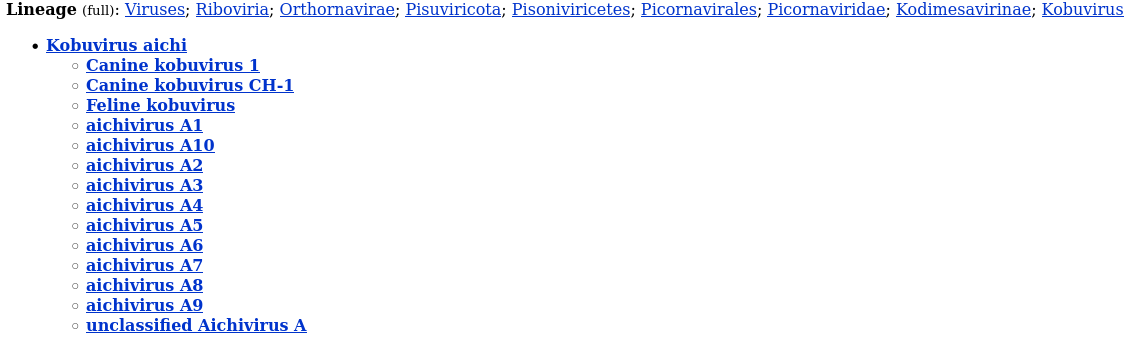
In this instance, we choose to align ourselves with the hazard list author’s intent, which is human-infecting aichivirus. Choosing the TaxID for Kobuvirus aichi would be too broad, and include children from Canine and Feline kobuvirus. So we choose aichivirus A1, after clicking through to confirm that the other strains A2-A10 have 1 or very few Entrez records associated with them. The TaxID of aichivirus A1 is 1313215, so we update our controlled_taxids.csv:
controlled_taxids.csv
list_acronym,list_item,tax_id,display_name,category,exempt_taxa,notes
SDNAHAZ,Aichivirus,"1313215",Aichivirus A1,Viruses,,Human-to-Human
If the other aichivirus had been worth including, we could have added multiple TaxIDs here as a comma separated list within the quotations (e.g. if we wanted to include A10, we’d have "1313215,2870382"), however in this instance the mapping is simple.
Taxonomy is a series of nested trees, and the Commec team has internal tooling which generates additional files for commec screen to detect any children of controlled TaxIDs. This can be done manually as well, so we create a children_of_controlled_taxids.csv file, and populate it as so:
children_of_controlled_taxids.csv
child_TaxID,controlled_TaxID,child_name
650132,1313215,Aichi virus A846/88
571505,1313215,Aichi virus human/HUN298/2000/HUN
This simply maps these additional TaxIDs to the entry on Aichivirus A1 in controlled_taxids.csv. In this case, they represent no rank isolates, including the reference prototype A846/88, the first isolate of this virus from Japan.
Of course the next step is iterating over the remaining list items from the SecureDNA hazard list, systematically adding them to the control list, and mapping them to appropriate TaxIDs.
With all the above in place, running commec screen with the --regions set to all, or one of the jurisdictions US, CN, AG, or EU, will ensure that our new SecureDNA control list items are caught and reported on during screening.
We have included the files for this example database for download with this blog post, which you can easily add to your own control list databases today! Note, however, as of version 2.0, Commec distributes custom databases derived from the outputs of our Control Lists, rather than the full (hundreds of Gb) NCBI Core Nucleotide and Clustered Non-redundant Protein databases. These databases will have less sensitivity around the newly-controlled organisms included in the SecureDNA hazard list1.
I led the development of the dynamic control list feature for Commec 2.0, but I’d like to acknowledge the fantastic global team of people working at IBBIS who contributed to the implementation and authoring of the control list databases (Yorgo El Moubayed, Lucas Boldrini, and Tessa Alexanian) as well other contributors to implementation of the v2.0.0 Commec release (Keegan Birt, Mackenzie Noon, and Manu Shivakumara). Thank you also to Tessa Alexanian for comments on this post.
1 Our next Tech Note will describe how we built the custom Best Match databases. If you’re already working on a custom control list, feel free to reach out to screening@ibbis.bio for support creating databases that are fully sensitive to your custom list. ↩